
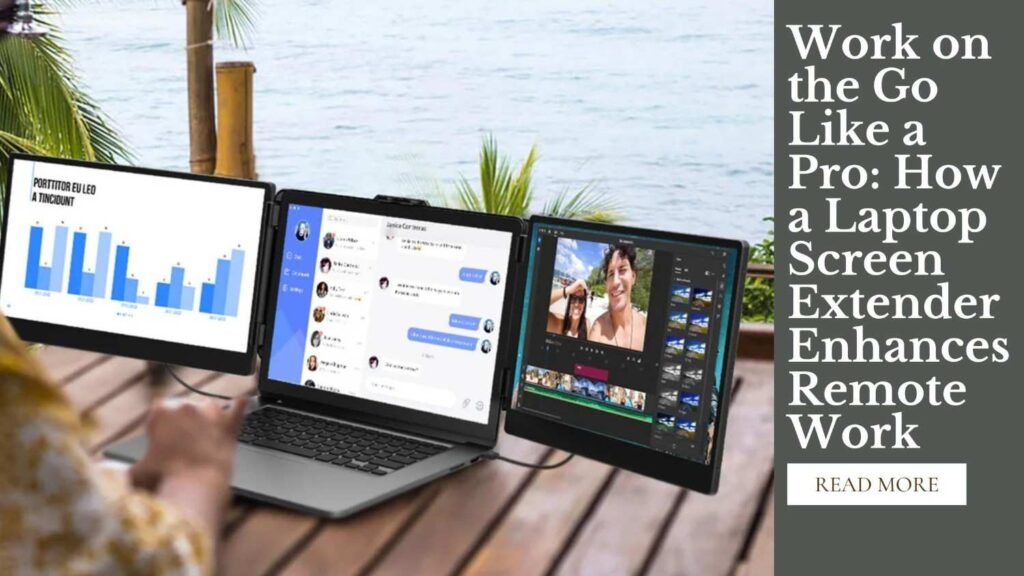
Remote work has transformed from a temporary solution to a full-fledged work mode for many. But working from home brings its own set of challenges—like trying to squeeze multiple spreadsheets, documents, and communication apps onto a single laptop screen. Enter the laptop screen extender: a game-changer for productivity. In this article, we’ll explore how a laptop screen extender can significantly enhance your remote work setup, making multitasking more manageable and less stressful.
The Magic of Multitasking: More Screen Real Estate
The biggest advantage of using a screen extender is the additional space for multitasking. Let’s delve into why this is crucial for remote workers.
Maximizing Efficiency
- Expanded Work Surface: With a screen extender, you won’t need to constantly minimize and maximize windows. Having two displays means you can have your email open on one screen while conducting research or drafting a document on the other.
- Reduced Task Switching: According to a study by the American Psychological Association, frequent task switching can cost as much as 40% of someone’s productive time. Having a dual-screen setup reduces the need to swap between tasks, thereby increasing overall efficiency.
- Improved Workflow: Graphic designers, data analysts, and even customer service professionals benefit from dual screens as they can dedicate one screen entirely to tools and applications necessary for their specific job functions.
Real-World Experiences
One of my friends, a content writer, always struggled with pulling information from multiple online sources while writing. After investing in a screen extender, she noticed a significant boost in her output and, surprisingly, a reduction in eye strain.
“I was skeptical at first, but the ease with which I can now manage reference material and my own writing has made it so worthwhile,” she mentioned.
Enhanced Focus and Reduced Clutter
A screen extender not only increases your productivity but also enhances your ability to focus by reducing digital clutter.
Streamlined Digital Environment
- Organized Virtual Desktop: By spreading applications or documents across two screens, you cultivate a more organized workspace, which can lead to enhanced cognitive functioning and less stress.
- Distraction Minimization: It becomes easier to keep work-related materials on one screen and less crucial distractions, such as social media or news websites, relegated to the background on the secondary monitor.
Psychological Impact
The environment we work in plays a significant role in our mental state. A tidy workspace helps in minimizing stress. In my personal experience, decluttering my digital space by using a screen extender has paralleled the soothing effect of organizing a messy desk.
Portability and Versatility
For many, remote work doesn’t just mean settling into a home office. It often includes working from coffee shops, co-working spaces, or even while on the move. Here is how a portable screen extender meets these needs.
Designed for Mobility
- Compact Designs: Modern screen extenders are lightweight and designed for easy portability. They often fold flat or can be easily tucked into a laptop bag, ideal for digital nomads.
- Quick Setup: Most extenders connect easily through USB or other standard interfaces, requiring minimal setup time. This means more time working and less time fiddling with technology.
Practical Usage Scenarios
Consider software developers who often work with lines of code on one screen and execution output on another. Whether at home or a café, the ease of having such a portable workstation can drastically improve their efficiency and also allow for versatile work locations.
Overcoming Potential Drawbacks
Like any technology, laptop screen extenders may come with potential downsides or challenges. Let’s explore how to overcome them.
Technical Considerations
- Compatibility Issues: Always ensure that the extender is compatible with your specific laptop model. Most manufacturers provide compatibility lists or guidelines.
- Power Consumption: Using an additional screen may consume more battery power. However, many extenders offer the option to connect to a power source, reducing the drain on your laptop battery.
“Understanding the specs before purchase can save a lot of hassle. Always check compatibility and power requirements to ensure a seamless experience,” advises tech consultant Lisa Nguyen.
Conclusion
Laptop screen extenders are valuable tools that enhance the remote work experience by increasing productivity, facilitating better organization, and offering desirable flexibility. With a multitude of options available, finding a screen extender that suits your specific needs could be the key to making remote work both efficient and enjoyable. Investing in the right equipment to optimize your home office can lead you to discover more balanced and productive work habits.
Imagine a workday where your tasks flow smoothly from one screen to another, minimizing chaos and maximizing focus.
Click the link below to take advantage of this special Prime Spring Deal and experience the power of dual screens on your laptop.
👉 Shop Now on Amazon & Save Big!
Don’t wait—this deal won’t last forever! Upgrade your setup today and start working smarter, not harder.