
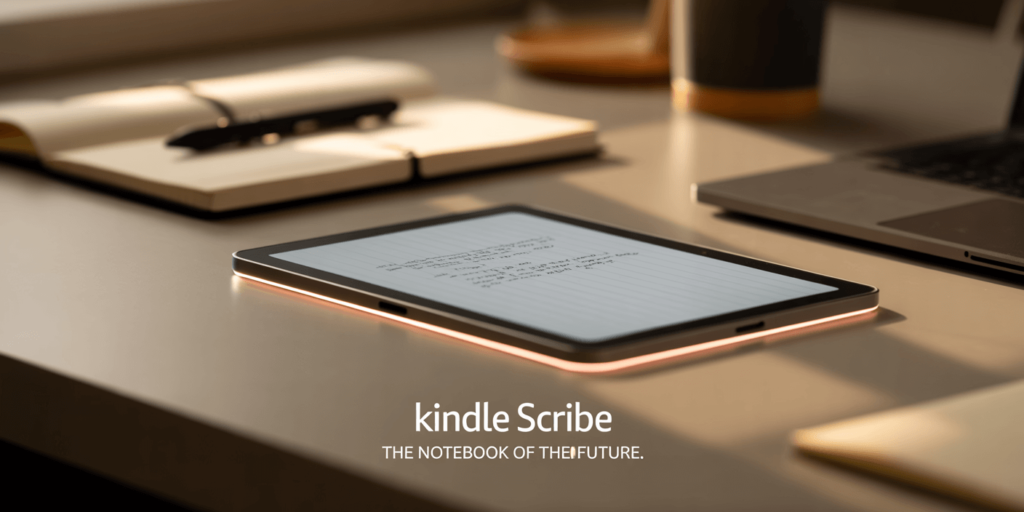
The Morning Mess That Started It All
Every morning, my desk looked like chaos in 3D: a Kindle Paperwhite buried under a pile of sticky notes, a half-filled paper planner, and a laptop trying to balance on top of everything.
Then came Amazon’s Kindle Scribe, a sleek E-Ink tablet promising to combine reading, writing, and AI-powered note-taking in one minimalist device. For a second, I thought: Could this finally clean up my messy workspace and maybe even replace my laptop?
What Exactly Is the Kindle Scribe?
The Kindle Scribe isn’t just another e-reader. It’s Amazon’s first attempt to fuse books, notebooks, and AI intelligence into one digital workspace.
It features a 10.2-inch glare-free Paperwhite display, a magnetically attached Premium Pen, and 64 GB of storage right out of the box.
Think of it as a three-in-one digital companion:
- E-Reader for books, PDFs, and magazines
- Digital Notebook for jotting thoughts or sketches
- AI Assistant that converts, organizes, and even summarizes your handwritten notes
“Our goal is simple: give customers a single canvas where books, ideas, and intelligent tools live together.” — Kevin Keith, VP, Amazon Devices
AI That Thinks While You Write
Handwriting Recognition & Smart Summaries
Amazon’s in-house machine-learning model powers real-time transcription: jot down bullet points, and the Scribe quietly turns them into editable text. Tap → “Smart Summary,” and it condenses a page of scrawls into a short paragraph.
- Multilingual recognition (English, Spanish, German at launch)
- Cloud-backed processing, so the model improves over time
- Privacy toggle to keep notes strictly on-device
Integration with Alexa and Kindle Cloud
Notes saved on Scribe automatically sync to your Kindle library. On an Echo speaker you can say, “Alexa, read today’s meeting notes,” and the assistant will play a text-to-speech version. Kindle Cloud Viewer (web) displays scanned handwriting alongside the AI-generated transcript.
For more details see Amazon’s developer blog post (link: https://www.aboutamazon.com/news/devices/new-amazon-kindle-scribe-color)
Design & Hardware: Bigger Screen, Smarter Pen
- 10.2-inch 300 PPI Paperwhite display
- Warm-light front LEDs for night reading
- 5.8 mm thick, 433 g—closer to an iPad Air than a classic Kindle
- Aluminum unibody chassis (recycled 75 %)
- “Premium Pen” attaches magnetically; no recharging required
During a short in-store demo I found the pen latency comparable to reMarkable 2 (about 20 ms) and far better than previous Kindle stylus experiments. The textured screen offers just enough resistance to feel like paper without sacrificing clarity.
Pricing & Competitors: Where Does $499.99 Land?
At $499.99 (64 GB, pen included), Scribe is Amazon’s most expensive e-ink product to date. Here’s how it stacks up:
Kindle Scribe vs. reMarkable 2
| Kindle Scribe | reMarkable 2 | |
| Price (incl. pen) | $499.99 | $478 (tablet + Marker) |
| Screen Size | 10.2″ 300 PPI | 10.3″ 226 PPI |
| AI Features | Transcription, summary, Alexa | None (raw handwriting) |
| File Sync | Kindle Cloud, email, Drive | reMarkable Cloud ($2.99 / mo) |
Scribe wins on display resolution and built-in AI, while reMarkable offers a thinner body (4.7 mm) and a focused, distraction-free interface.
Kindle Scribe vs. iPad + Apple Pencil
If you need color, a web browser, or high-frame-rate video, an iPad remains the versatile option. Yet heavy writers might prefer e-ink’s eyestrain-free canvas and weeks-long battery life.
- iPad (10th gen) with Pencil = roughly $599
- LCD glare outdoors, but full multitasking
- Hundreds of note-taking apps versus Scribe’s streamlined OS
Early Hands-On Impressions
I spent about 45 minutes with a retail demo unit:
- Text looks razor-sharp even classic comics were readable.
- The pen’s click-to-erase feature felt natural; double-click toggled a highlighter.
- “Smart Summary” handled my sloppy cursive surprisingly well, though scientific symbols still tripped it up.
- Exporting notes as Markdown worked, but embedded diagrams became low-res images.
I did notice very slight ghosting when flipping from dense PDFs to blank notebook pages. Amazon’s rep says future firmware will address this.
Should You Buy It? Questions to Ask Yourself
- Do you primarily read in black-and-white?
- Is handwriting crucial to your workflow?
- Do you value weeks of battery life over app diversity?
- Will AI summaries genuinely save you time, or is raw pen-on-paper enough?
If you answered “yes” to most, Kindle Scribe could replace both your Kindle and your stack of notebooks. Otherwise, a standard Kindle or a multipurpose tablet may suit you better.
Final Thoughts: The Future of Digital Note-Taking
Kindle Scribe is Amazon’s boldest attempt yet to merge reading, writing, and artificial intelligence into a single e-ink slab. The $499.99 price is steep, but buyers get a high-resolution screen, a lag-free pen, and cloud-powered features that competing e-ink tablets lack. Whether it becomes your ultimate notebook hinges on how much value you place on distraction-free focus and automated note-taking magic.
Still unsure? Swing by a local Amazon kiosk and try writing a grocery list or your next novel on it. Your paper notebook won’t disappear overnight, but it might start gathering dust.